
Guide
Kubernetes Clusters
Create, run and manage local Kubernetes clusters built on Apple container's k8s plugin - grouped nodes, one-click kubeconfig, and a terminal that opens ready for kubectl.
container 1.2.2+ (ships the k8s plugin) · macOS 26 · Apple silicon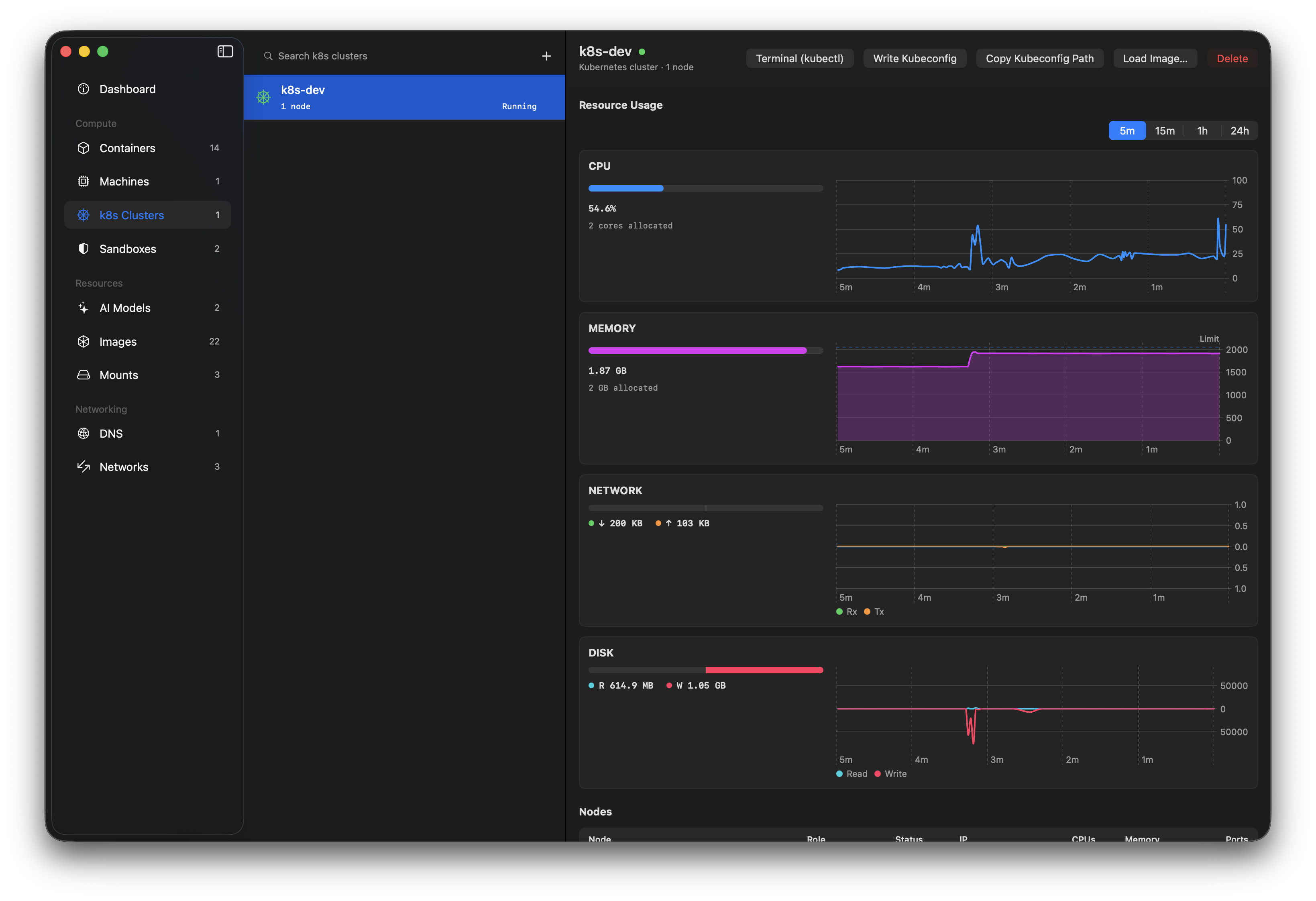
What is a container k8s cluster?
Apple container 1.2.2 ships a k8s plugin that bootstraps a local single-node Kubernetes cluster from a kindest/node image: the node is an ordinary container running containerd and kubelet, initialised with kubeadm and wired up with the kindnet CNI. The control-plane container's name is the cluster's name, and its API server is published to your Mac.
Because cluster nodes are just containers carrying plugin labels, Orchard derives clusters straight from the container list it already watches - the same grouping the CLI's container k8s list uses. Node containers are badged in the containers list too, so a kindest/node row is never a mystery.
The plugin has no XPC API, so lifecycle actions go through the container k8s CLI; node state comes from the container XPC snapshot Orchard already streams.
What Orchard does
Clusters, grouped
Node containers are grouped into named clusters with per-node role, status, IP, CPUs, memory and published ports.
Lifecycle
Create at the Kubernetes version you choose, with optional CPU/memory overrides and a custom CNI manifest, and delete with confirmation before anything destructive.
Load local images
Push any image from Orchard's image list into the cluster's containerd, so pods can use it without a registry.
kubectl access
Write or merge the cluster's context into your kubeconfig, copy the kubeconfig path, or open a terminal with the context already selected.
Plugin badges
Cluster nodes show a plugin badge (e.g. "k8s · control-plane") in the containers list and detail header.
Guardrails
Installs without the k8s plugin get an explanatory state with upgrade guidance instead of broken buttons.
Getting started
-
Open the Clusters section
Select Clusters in the sidebar. If your
containerinstall predates the k8s plugin (before 1.2.2), the section explains that and links to upgrade instructions. -
Create a cluster
Click + (or "Create Cluster"). The default name is
k8s-dev; resource defaults come from the runtime unless you override them. Kubernetes Version defaults to the node image the k8s plugin ships with (marked Recommended); the menu also lists the newestkindest/noderelease of each version from 1.31, or you can give any tagged image. Under Advanced, a CNI manifest replaces the default kindnet. The first create pulls the Kubernetes node image (roughly 850 MB) and bootstraps the control plane withkubeadm, so expect it to take several minutes. -
Point kubectl at it
In the cluster's detail view, Write Kubeconfig merges the cluster's context into
~/.kube/config(named after the cluster), or use Terminal (kubectl) to open your preferred terminal with the context already selected. -
Run your images
Load Image… exports an image from Orchard's local store into the cluster nodes' containerd. Reference it from a pod spec with
imagePullPolicy: Never(or a matching tag) and no registry is needed.
Pitfalls & things to know
A stopped cluster can't be restarted
Apple container 1.5.0 removed container k8s start, so a cluster whose node has stopped (after a reboot or container system stop, for example) can only be deleted and created again. Recreate on the stopped cluster does both in one step, with the same name, resources, Kubernetes version and CNI. Workloads and images loaded into it aren't kept, so keep your manifests somewhere you can re-apply them from.
A custom CNI has to fit the cluster
Orchard passes the manifest straight to the plugin, which applies it once the control plane is up. A manifest whose pod network overlaps the cluster's (Cilium's default IP settings do, for instance) leaves a cluster that never becomes ready. See the Custom CNI section of Apple container's Kubernetes guide.
Single-node clusters (for now)
The plugin creates one control-plane node per cluster and untaints it so workloads schedule there. Worker naming (<cluster>-worker-N) is already part of the plugin's model, and Orchard's grouping supports workers as soon as the plugin can create them.
Creation is slow the first time
The kindest/node image is a large download, and kubeadm init plus CNI rollout takes a while even after it's cached. Orchard shows the create as in-progress; the cluster appears in the list when it's ready.
Delete removes workloads
Deleting a cluster deletes its node containers and everything running on them. Orchard asks for confirmation, but there's no undo.
The API server rides a published port
The cluster's API server is published from the node's 6443 to a host port (6445 upwards). write-config takes care of the endpoint, so kubectl works without thinking about it; the mapping is visible on the node's row.
Deploy with the tools you know
Orchard deliberately stops at cluster and node management. Applying manifests, inspecting workloads and port-forwarding are kubectl / k9s / Lens territory - the terminal button drops you there with the right context selected.
Requirements
- Apple
container1.2.2 or later - earlier releases don't ship thek8splugin (1.2.1's package had a packaging bug). - macOS 26 (Tahoe) on Apple silicon, the same floor Orchard already requires.
kubectlon your Mac for the terminal button - the cluster works without it, but that button assumes it's installed.