

Guide
Container Machines
Create, configure, run and monitor Apple container machines (persistent Linux VMs) from Orchard, natively over XPC. No shelling out to the CLI.
container 1.0+ · macOS 26 · Apple silicon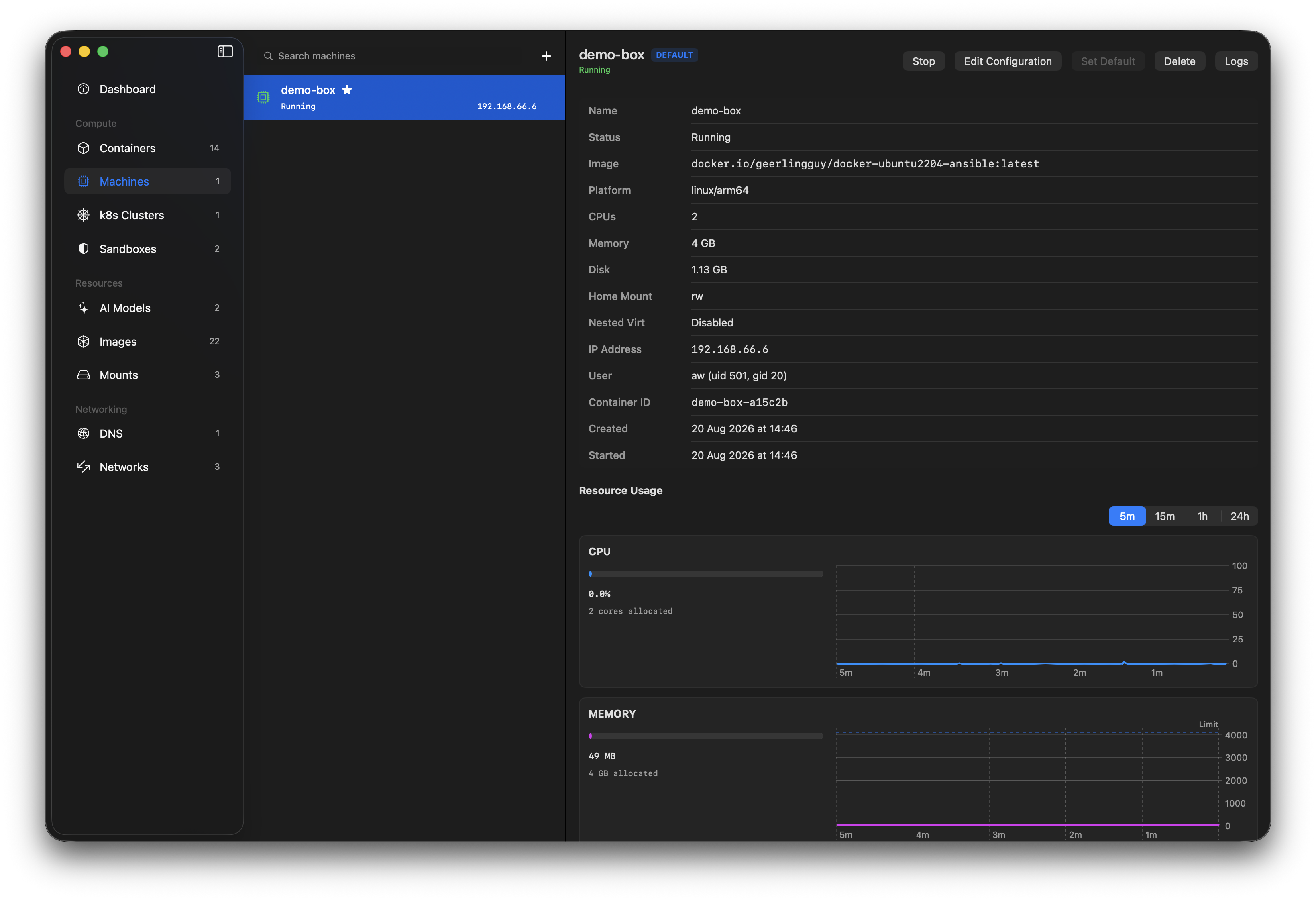
What is a container machine?
A container machine is a persistent, stateful Linux VM: “fast and lightweight like a container, persistent like a virtual machine.” Unlike a container, it boots the image's init system (systemd or openrc) as PID 1, so long-running services survive. Changes persist across stop/start; deleting a machine removes its storage.
Your macOS user, UID/GID and home directory are mapped in automatically (via virtiofs, with passwordless sudo), so it feels like a local Linux box. Under the hood a machine is a container tagged with a special label, so Orchard hides those backing containers from the normal container list to keep it uncluttered.
Orchard talks to the machine service directly through Apple's MachineAPIClient XPC surface (the same API the container CLI uses) rather than shelling out.
What Orchard does
Create & configure
Pick an image, set CPUs, memory, home-mount mode, nested virtualization and an optional custom kernel.
Lifecycle
Start, stop, delete and set-default, with clear in-progress feedback for each action.
Edit & restart
Change a machine's resources and apply them with a one-click stop, apply and restart.
Logs
Stream a machine's output and boot logs in the same multi-pane viewer as containers.
Resource usage
Live CPU, memory, network and disk, in the machine's detail view and on the dashboard.
Guardrails
Warns before creating from an image with no init system, and explains a machine that stopped because of it.
Getting started
⚠ Pick an image with an init system first
This is the single most common gotcha. A machine boots the image's /sbin/init (systemd or openrc). Stock images (ubuntu, alpine, nginx, most base images) have no init, so the machine boots and then immediately stops.
Use an image built to run an init system. A known-good option on Apple silicon:
geerlingguy/docker-ubuntu2204-ansible:latestredhat/ubi9-init is a lighter, non-Ubuntu alternative. Orchard shows a warning in the create form when the image you enter looks like it lacks an init system.
-
Open the Machines section
Select Machines in the sidebar. If your
containerinstall predates machine support, the section shows an explanatory empty state instead. -
Create a machine
Click + (or “Create Machine”). Enter an init-capable image and a name, then set CPUs and memory with the steppers; both default to about half of your host. Choose a home-mount mode, and optionally enable nested virtualization or a custom kernel. It boots by default.
-
Use it
The detail view shows its state, IP, image, resources and mapped user. Start/stop/delete/set-default from the header, watch resource usage below, and open Logs for the output and boot streams.
-
Reconfigure when needed
Edit Configuration changes CPUs, memory, home-mount, virtualization or kernel. These only take effect on the next boot, so for a running machine choose Apply & Restart to apply them in one step.
Pitfalls & things to know
The image must have an init system
If a machine shows stopped right after you create it, the image almost certainly has no /sbin/init. The boot log shows exec: /sbin/init: not found and the process exits with status 127. Orchard surfaces this as “Stopped: the image has no init system.” Recreate from an init-enabled image (see above).
“Read/Write” home mount exposes your home directory
By default the machine gets read/write access to your macOS home directory. That's convenient, but it means anything running in the machine can modify your files. Choose Read-Only or None when you don't need it.
Config changes need a restart
Apple's runtime only applies CPU/memory/home-mount/kernel changes on the next boot. Editing a running machine won't change it live, so use Apply & Restart, or stop and start it yourself.
Memory defaults to half your host RAM
A new machine reserves roughly half your system memory unless you lower it. It's easy to over-allocate if you run several, so the create form shows your host totals to help you size sensibly.
Delete removes persistent storage
Deleting a machine permanently removes its disk. Orchard asks for confirmation, but there's no undo, and snapshots aren't part of the runtime.
It's a young feature
Container machines are new in Apple's container 1.0. Some rough edges are upstream (e.g. amd64 machines and DNS can be flaky). Orchard surfaces failures rather than hiding them, and routes machine issues to its diagnostics.
Requirements
- Apple
container1.0 or later (the machine API server ships with it). - macOS 26 (Tahoe) on Apple silicon, the same floor Orchard already requires.
- Nested virtualization additionally needs an Apple silicon M3 or later chip, macOS 15+, and a kernel with
CONFIG_KVM.
Machines don't do host port forwarding, so reach a service on its machine IP, shown in the detail view.